I created https://github.com/p47t/rec.2020 using Gemini 3 Pro and Antigravity IDE. You can view the created app at https://p47t.github.io/rec.2020/.
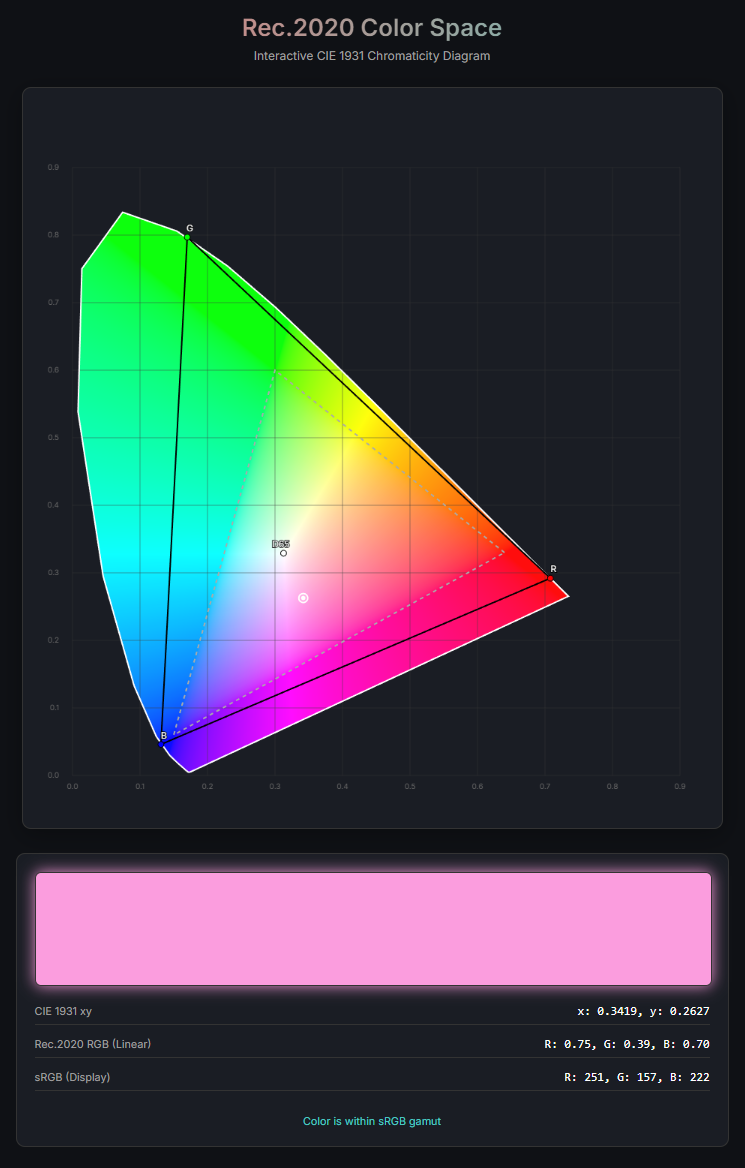
Here is how I built it:
- Initial Commit: I started by asking Gemini to “create a web app that visualizes Rec.2020 color gamut”. It immediately created the project files with a basic canvas implementation.
- Improvements: I then asked for more improvements to refine the UI.
- Interactive Features: To make it more useful, I requested “show coordinates during mousemove”, which Gemini implemented flawlessly, handling the coordinate transformations correctly.
- Color Accuracy: I also asked it to fix incorrect sRGB gamut checking and draw sRGB triangle for easy verification. Gemini understood the color science requirements and implemented the correct mathematical conversions to display the sRGB triangle within the Rec.2020 space.
- Deployment: Finally, I asked for a “deployment guide”, and it generated a comprehensive
DEPLOY.mdwith instructions. - Bug Fix: I found another issue caused by scaled canvas display where color selection was inaccurate. Gemini identified the problem and fixed the coordinate calculation to support resized windows.
The entire process was incredibly smooth. I didn’t have to write a single line of boilerplate code. Gemini 3 Pro understood high-level intent and complex domain knowledge (color spaces) equally well.