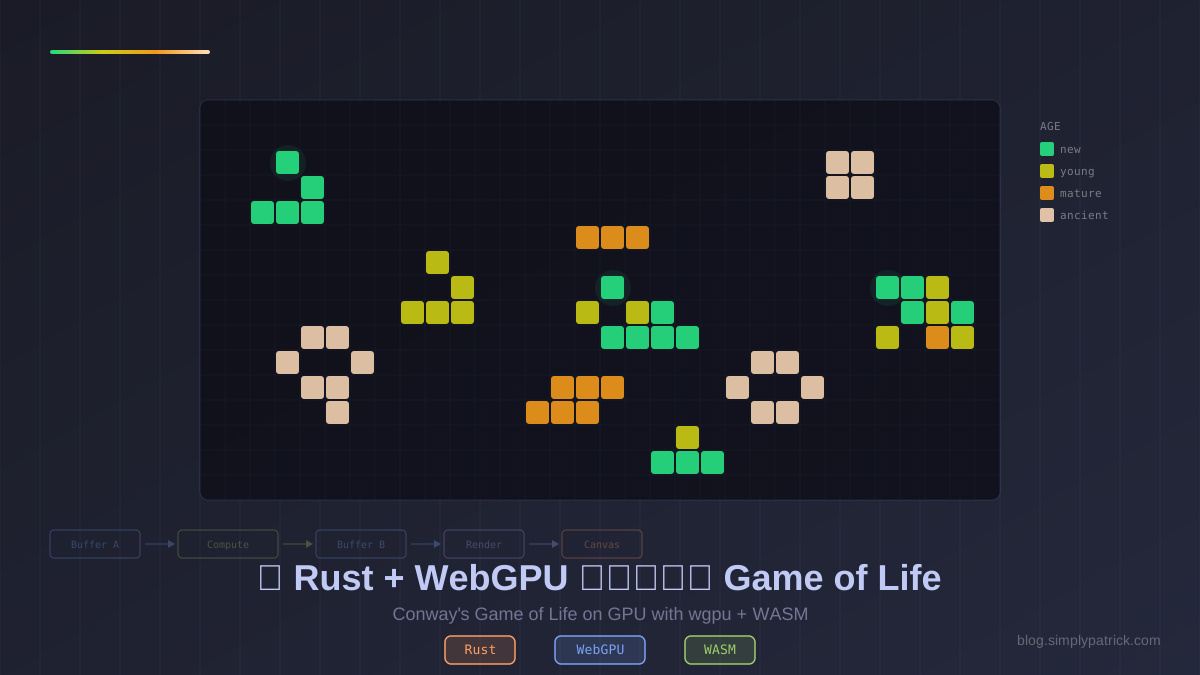
這個專案把 Conway’s Game of Life 搬到 GPU 上面跑——用 Rust 的 wgpu 寫 WebGPU compute shader,編譯成 WASM 在瀏覽器裡執行。128x128 的網格、上萬個細胞的模擬,全部在 GPU 上平行計算。
專案原始碼:wgpu-game-of-life
先玩再說
操作方式:Play/Pause 開始模擬,點擊畫布可以畫細胞,Speed 調整速度。需要 WebGPU 支援的瀏覽器(Chrome 113+、Edge 113+、Firefox 141+)。
顏色代表細胞年齡:綠色是新生的,黃色是年輕的,橘色是成熟的,白色是古老的 still life 結構。
為什麼做這個?
在完成 WASM Markdown 編輯器之後,我想更深入探索 WASM 的可能性。Markdown 編輯器純粹是 CPU 計算,但現代瀏覽器已經支援 WebGPU——可以直接存取 GPU 的算力。
Game of Life 是個完美的入門專案:
- 天然適合平行計算:每個細胞的下一代只取決於鄰居,可以完全並行
- 需要 compute shader + render pipeline:同時學兩種 GPU 程式設計模式
- 視覺回饋即時:寫完馬上看到結果
- 規模剛好:不會太大,但足以理解 GPU 程式設計的核心概念
技術架構
整體流程
核心是 ping-pong 雙緩衝:兩個 storage buffer 交替讀寫。每一步模擬時,compute shader 從一個 buffer 讀取當前狀態,計算下一代寫入另一個 buffer,然後交換。Render pipeline 負責把結果畫到畫面上。
專案結構
wgpu-game-of-life/
├── Cargo.toml
├── src/
│   ├── lib.rs           # WASM 進入點,匯出 API
│   ├── gpu.rs           # wgpu 初始化、pipeline 建立、模擬邏輯
│   ├── compute.wgsl     # Compute shader(Game of Life 規則)
│   └── render.wgsl      # Vertex + Fragment shader(網格視覺化)
├── index.html
└── www/
    ├── index.js         # 控制邏輯、動畫迴圈、滑鼠互動
    └── styles.css
Rust 依賴項
[dependencies]
wgpu = "24"                        # WebGPU API
wasm-bindgen = "0.2"               # JS 互操作
wasm-bindgen-futures = "0.4"       # async 支援(wgpu 初始化是 async 的)
web-sys = { version = "0.3", features = ["Document", "Window", "Element", "HtmlCanvasElement", "console"] }
console_error_panic_hook = "0.1"
js-sys = "0.3"
bytemuck = { version = "1", features = ["derive"] }
跟 Markdown 編輯器比,多了 wgpu(核心)、wasm-bindgen-futures(因為 GPU 初始化是非同步的)和 bytemuck(安全地把 Rust 資料轉成 GPU buffer 需要的位元組)。
Compute Shader:Game of Life 規則
這是整個專案最核心的部分——用 WGSL 寫的 compute shader:
@group(0) @binding(0) var<uniform> grid: vec2u;
@group(0) @binding(1) var<storage, read> cells_in: array<u32>;
@group(0) @binding(2) var<storage, read_write> cells_out: array<u32>;

@compute @workgroup_size(8, 8)
fn main(@builtin(global_invocation_id) id: vec3u) {
    if (id.x >= grid.x || id.y >= grid.y) { return; }

    // 數 8 個鄰居(環形邊界)
    var neighbors: u32 = 0u;
    for (var dy: i32 = -1; dy <= 1; dy++) {
        for (var dx: i32 = -1; dx <= 1; dx++) {
            if (dx == 0 && dy == 0) { continue; }
            let nx = u32((i32(id.x) + dx + i32(grid.x)) % i32(grid.x));
            let ny = u32((i32(id.y) + dy + i32(grid.y)) % i32(grid.y));
            neighbors += select(0u, 1u, cells_in[cell_index(nx, ny)] > 0u);
        }
    }

    let idx = cell_index(id.x, id.y);
    let age = cells_in[idx];

    // Conway's rules + 年齡追蹤
    if (neighbors == 3u && age == 0u) {
        cells_out[idx] = 1u;                    // 誕生
    } else if (age > 0u && (neighbors == 2u || neighbors == 3u)) {
        cells_out[idx] = min(age + 1u, 255u);   // 存活,年齡 +1
    } else {
        cells_out[idx] = 0u;                    // 死亡
    }
}
幾個重點:
@workgroup_size(8, 8):每個工作群組處理 8x8 = 64 個細胞,GPU 會自動分配到各個核心cells_in是唯讀,cells_out是可寫:避免讀寫衝突,這就是為什麼需要兩個 buffer- 環形邊界(toroidal wrapping):左邊超出會接到右邊,上面超出接到下面
- 年齡追蹤:不只是 0/1,而是記錄細胞存活了幾代(上限 255)
128x128 的網格需要 dispatch ceil(128/8) × ceil(128/8) = 16 × 16 = 256 個工作群組,每個群組 64 個執行緒,總共 16,384 個 GPU 執行緒平行計算。
Render Shader:年齡上色
Fragment shader 根據年齡把細胞染成不同顏色:
fn age_color(age: u32) -> vec4f {
    if (age == 0u) {
        return vec4f(0.06, 0.06, 0.12, 1.0);  // 死亡:深色背景
    }
    let t = clamp(f32(age - 1u) / 50.0, 0.0, 1.0);

    // 顏色漸層:亮綠 → 黃綠 → 橘 → 暖白
    let c0 = vec3f(0.15, 0.90, 0.30);  // 新生
    let c1 = vec3f(0.80, 0.90, 0.15);  // 年輕
    let c2 = vec3f(0.95, 0.60, 0.10);  // 成熟
    let c3 = vec3f(1.00, 0.85, 0.70);  // 古老

    // 三段線性插值
    if (t < 0.33) { return mix(c0, c1, t / 0.33); }
    else if (t < 0.66) { return mix(c1, c2, (t - 0.33) / 0.33); }
    else { return mix(c2, c3, (t - 0.66) / 0.34); }
}
渲染方式是畫一個全螢幕四邊形(6 個頂點、2 個三角形),fragment shader 根據 UV 座標查詢對應的細胞年齡。這比為每個細胞生成幾何體(instanced rendering)更簡單,而且效能足夠。
Rust 端:wgpu 初始化
wgpu 在 WASM 環境下的初始化跟 native 基本一樣,只是 surface 從 canvas 建立:
// 從 HTML canvas 建立 surface
let instance = wgpu::Instance::new(&wgpu::InstanceDescriptor {
    backends: wgpu::Backends::BROWSER_WEBGPU | wgpu::Backends::GL,
    ..Default::default()
});

let surface = instance
    .create_surface(wgpu::SurfaceTarget::Canvas(canvas))
    .expect("failed to create surface");

// 請求 adapter 和 device(非同步)
let adapter = instance.request_adapter(&wgpu::RequestAdapterOptions {
    compatible_surface: Some(&surface),
    ..Default::default()
}).await.expect("no adapter");

let (device, queue) = adapter.request_device(
    &wgpu::DeviceDescriptor {
        required_limits: wgpu::Limits::downlevel_webgl2_defaults()
            .using_resolution(adapter.limits()),
        ..Default::default()
    },
    None,
).await.expect("no device");
Backends::BROWSER_WEBGPU | Backends::GL 讓它在支援 WebGPU 的瀏覽器用 WebGPU,不支援的用 WebGL2 作為 fallback。
Ping-Pong 雙緩衝
最有趣的設計是 bind group 的建立——為了實現 ping-pong,我們建兩組 bind group:
let compute_bind_groups = [
    // Step 0: 讀 A,寫 B
    create_bind_group(&cell_buffers[0], &cell_buffers[1]),
    // Step 1: 讀 B,寫 A
    create_bind_group(&cell_buffers[1], &cell_buffers[0]),
];
每一步模擬只要切換 step_index,就自動交換讀寫方向。
WASM API 設計
Rust 端透過 thread_local! 儲存全域狀態,匯出簡單的函式給 JavaScript:
為什麼需要 thread_local!?因為 #[wasm_bindgen] 匯出的必須是自由函式,JavaScript 呼叫 step()、render() 時不會帶著物件——所以 Simulation 必須存在模組層級的 static 裡。但一般的 static 要求內容必須實作 Sync,而 RefCell 不是 Sync。Simulation 裡面持有的 wgpu 資源(Device、Queue、Surface 等)也不是 Send/Sync 的。thread_local! 讓每個執行緒擁有自己的副本,繞過了 Sync 的限制——在 WASM 環境下本來就只有一個執行緒,所以它實際上就是一個不需要 Sync 的全域可變變數。
thread_local! {
    static SIMULATION: RefCell<Option<Simulation>> = RefCell::new(None);
}

#[wasm_bindgen]
pub async fn start(canvas_id: &str, grid_width: u32, grid_height: u32) {
    console_error_panic_hook::set_once();
    let sim = Simulation::new(canvas_id, grid_width, grid_height).await;
    SIMULATION.with(|s| *s.borrow_mut() = Some(sim));
}

#[wasm_bindgen]
pub fn step() {
    with_sim(|sim| sim.step());
}

#[wasm_bindgen]
pub fn toggle_cell(x: u32, y: u32) {
    with_sim(|sim| sim.toggle_cell(x, y));
}
start() 是 async 的,因為 wgpu 初始化(request_adapter、request_device)都是非同步操作。其他函式都是同步的。
CPU 端的細胞鏡像
一個實作上的巧妙之處:我們在 CPU 端維護一份細胞狀態的副本。
為什麼?因為當使用者點擊畫布要切換某個細胞時,從 GPU 讀回資料(readback)是很昂貴的操作。所以我們在 CPU 端維護一份鏡像,toggle 時修改 CPU 資料再上傳到 GPU:
pub fn toggle_cell(&mut self, x: u32, y: u32) {
    let idx = (y * self.grid_width + x) as usize;
    self.cells[idx] = if self.cells[idx] > 0 { 0 } else { 1 };
    self.queue.write_buffer(&self.cell_buffers[buf_idx], 0,
        bytemuck::cast_slice(&self.cells));
    self.render();
}
每次 step() 時也同步執行 CPU 端的模擬,確保鏡像保持一致。
建置與執行
cd wgpu-game-of-life
wasm-pack build --target web
python -m http.server 8080
# 開啟 http://localhost:8080
建置輸出:
- WASM 檔案:117 KB
- JS 膠水程式碼:57 KB
- 總計:~174 KB
比 Markdown 編輯器的 235 KB 還小,主要因為 wgpu 的 WASM backend 大部分邏輯在瀏覽器原生的 WebGPU API 裡。
學到的東西
WebGPU / wgpu 特定
- Compute shader 比想像中簡單:WGSL 語法接近 Rust,workgroup/dispatch 的概念很直覺
- Bind group 是關鍵抽象:它定義了 shader 能存取哪些資源,切換 bind group 就能改變資料流向
- wgpu 的跨平台設計很優秀:同一份 Rust 程式碼,換個 backend 就能在 native 和 WASM 上跑
- GPU readback 很貴:不要隨便從 GPU 讀資料回來,用 CPU 鏡像是常見的解法
跟 Markdown 編輯器的比較
| Markdown 編輯器 | Game of Life | |
|---|---|---|
| GPU 使用 | 無 | Compute + Render |
| 非同步初始化 | 否 | 是(wgpu 需要 async) |
| 主要瓶頸 | CPU 解析 | GPU shader 編譯 |
| 互動模式 | 文字輸入 | 滑鼠繪圖 + 動畫迴圈 |
| 套件大小 | 235 KB | 174 KB |
結語
這是我第一次寫 GPU shader 程式——用 Rust 配 wgpu 的體驗非常好。wgpu 把 WebGPU 的複雜性封裝得很乾淨,而 WGSL shader 語言的設計也很現代。
如果你也想學 WebGPU,Game of Life 真的是個很好的起點:概念簡單、視覺效果漂亮、而且剛好涵蓋 compute pipeline 和 render pipeline 兩個核心概念。