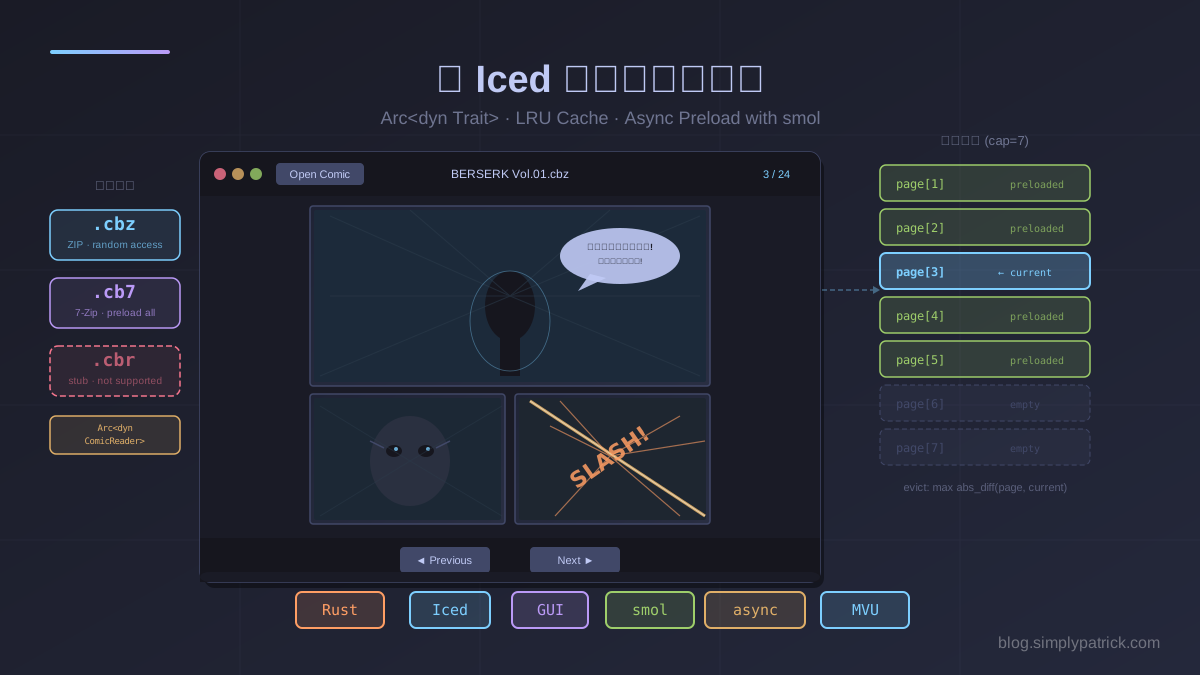
最近用 Iced 實作了一個漫畫閱讀器——能打開 CBZ、CB7 格式的漫畫壓縮檔,支援鍵盤翻頁,還有背景預載機制讓翻頁幾乎感受不到延遲。
這篇文章聚焦在幾個有趣的設計決策:trait object 搭配 Arc 的多格式抽象、以「距離」驅逐的 LRU 快取、以及 smol::unblock 把同步 I/O 推進執行緒池的技巧。
專案概述
comic-viewer 支援的功能:
- 開啟 CBZ(ZIP)、CB7(7-Zip)格式漫畫檔
- CBR(RAR)格式顯示友善的錯誤訊息(需外部函式庫,目前為 stub)
- 鍵盤翻頁(方向鍵、PageUp/PageDown)
- 頁面快取(最多 7 頁),快取命中時翻頁瞬間完成
- 背景預載:目前頁面前後各 2 頁
- Tokyo Night Storm 主題的深色 UI
專案結構很清楚:
comic-viewer/
├── Cargo.toml
└── src/
    ├── main.rs          # Iced 應用程式主體(App、Message、PageCache)
    └── reader/
        ├── mod.rs       # ComicReader trait + open() 工廠函式
        ├── cbz.rs       # ZIP 格式實作
        ├── cb7.rs       # 7-Zip 格式實作
        └── cbr.rs       # RAR stub
1. Arc<dyn ComicReader>:多格式的 Trait Object 抽象
不同壓縮格式的解壓縮方式差異很大,但對應用程式來說只需要「給我第 N 頁的圖片」。ComicReader trait 完美地封裝這個差異:
pub trait ComicReader: Send + Sync + std::fmt::Debug {
    fn title(&self) -> &str;
    fn page_count(&self) -> usize;
    fn extract_page(&self, index: usize) -> Result<iced::widget::image::Handle, String>;
}
幾個設計細節值得注意:
Send + Sync:因為App.comic是Option<Arc<dyn ComicReader>>,而Arc<T>要求T: Send + Sync才能跨執行緒共享。背景預載任務會 clone 這個Arc並在 smol 的執行緒池跑,所以必須是Sync&self而非&mut self:extract_page刻意設計成不可變借用,這樣就能從多個執行緒同時呼叫,不需要加鎖std::fmt::Debug:讓整個Appstruct 可以 deriveDebug(Iced 有時會要求)
工廠函式用副檔名做格式分派:
pub fn open(path: &Path) -> Result<Box<dyn ComicReader>, String> {
    match path
        .extension()
        .and_then(|e| e.to_str())
        .map(str::to_lowercase)
        .as_deref()
    {
        Some("cbz") => cbz::CbzReader::open(path).map(|r| Box::new(r) as Box<dyn ComicReader>),
        Some("cbr") => cbr::CbrReader::open(path).map(|r| Box::new(r) as Box<dyn ComicReader>),
        Some("cb7") => cb7::Cb7Reader::open(path).map(|r| Box::new(r) as Box<dyn ComicReader>),
        ext => Err(format!("Unsupported format: {}", ext.unwrap_or("none"))),
    }
}
呼叫端接到 Box<dyn ComicReader> 後立刻包進 Arc::from(box),讓後續可以廉價 clone 給多個背景任務:
Task::perform(
    async move { smol::unblock(move || reader::open(&path).map(Arc::from)).await },
    Message::ComicLoaded,
)
Arc::from(box) 把 Box<dyn ComicReader> 轉成 Arc<dyn ComicReader>——這個轉換是零成本的,只是改變了「誰擁有這塊記憶體的所有權計數器」。
2. CBZ 與 CB7 的不同解壓策略
ZIP 和 7-Zip 的壓縮原理不同,導致兩種 reader 的實作策略截然不同。
CBZ(ZIP):隨機存取,按需解壓
ZIP 格式的每個檔案是獨立壓縮的,可以不看前面的 entry 直接跳到任意 entry 開始解壓。CbzReader 利用這個特性,只在記憶體中保留整份 .cbz 的原始位元組,每次 extract_page 再用 Cursor 包起來重新開一個 ZipArchive:
#[derive(Debug)]
pub struct CbzReader {
    title: String,
    pages: Vec<String>,      // 排序後的圖片檔名列表
    archive_bytes: Vec<u8>,  // 整份 .cbz 的原始位元組
}

impl ComicReader for CbzReader {
    fn extract_page(&self, index: usize) -> Result<image::Handle, String> {
        let filename = self.pages.get(index)
            .ok_or_else(|| format!("Page index {index} out of bounds"))?;
        let cursor = std::io::Cursor::new(&self.archive_bytes);
        let mut archive = zip::ZipArchive::new(cursor).map_err(|e| e.to_string())?;
        let mut file = archive.by_name(filename).map_err(|e| e.to_string())?;
        let mut bytes = Vec::new();
        file.read_to_end(&mut bytes).map_err(|e| e.to_string())?;
        Ok(image::Handle::from_bytes(bytes))
    }
}
每次 extract_page 都重新建立 ZipArchive,看似浪費,但因為 ZipArchive::new 只是 parse ZIP 的 central directory(在檔案末尾,很快),解壓單頁的成本主要在 inflate,整體還是很快的。
CB7(7-Zip):區塊壓縮,開檔時全部解壓
7-Zip 使用 LZMA/LZMA2 區塊壓縮,整個壓縮包的資料是相互依賴的,沒辦法隨機存取單一 entry。Cb7Reader 乾脆在 open() 時一次解壓全部圖片,把位元組存進記憶體:
#[derive(Debug)]
pub struct Cb7Reader {
    title: String,
    pages: Vec<Vec<u8>>,  // 每頁的原始圖片位元組,開檔時全部解壓好
}

impl Cb7Reader {
    pub fn open(path: &Path) -> Result<Self, String> {
        let mut reader = SevenZReader::open(path, Password::empty())
            .map_err(|e| e.to_string())?;

        let mut entries: Vec<(String, Vec<u8>)> = Vec::new();
        reader.for_each_entries(|entry, reader| {
            if entry.is_directory() || !super::is_image_file(entry.name()) {
                return Ok(true); // 跳過,繼續
            }
            let mut bytes = Vec::new();
            reader.read_to_end(&mut bytes).map_err(sevenz_rust::Error::from)?;
            entries.push((entry.name().to_owned(), bytes));
            Ok(true)
        }).map_err(|e| e.to_string())?;

        entries.sort_by(|(a, _), (b, _)| a.cmp(b));
        // ...
    }
}
開檔比 CBZ 慢(要解壓全部內容),但 extract_page 就只是 .clone() 一個 Vec<u8>,非常快。
這是一個典型的「把開銷前移」設計:把慢的動作(解壓縮)移到啟動時,換取後續每次存取都接近零成本。
CBR(RAR):誠實的 Stub
RAR 格式需要 unrar native library,不是純 Rust 可以輕鬆搞定的。CbrReader 選擇一個直白但很務實的做法:
impl CbrReader {
    pub fn open(_path: &Path) -> Result<Self, String> {
        Err(
            "CBR (RAR) format is not yet supported. \
             Consider converting to CBZ using Calibre or 7-Zip."
                .to_string(),
        )
    }
}
在 open() 時就立刻回傳清楚的錯誤和建議,不讓使用者走到一半才踩雷。這樣的 stub 還有個好處:整個程式的型別系統是完整的,未來只需要填充 CbrReader::open 的實作就好,其餘不用改。
3. 以「距離」驅逐的 LRU 快取
傳統 LRU 快取驅逐最久未使用的項目,但對漫畫閱讀器來說「最久未使用」不是最好的策略——你更想保留目前頁面周圍的頁面,而不是剛才看完的頁面。
PageCache 改用「距離目前頁面最遠的項目優先驅逐」:
const CACHE_CAPACITY: usize = 7;

struct PageCache {
    entries: HashMap<usize, image::Handle>,
}

impl PageCache {
    fn insert(&mut self, index: usize, handle: image::Handle, current_page: usize) {
        if !self.entries.contains_key(&index) && self.entries.len() >= CACHE_CAPACITY {
            // 找距離 current_page 最遠的 key
            let evict = *self
                .entries
                .keys()
                .max_by_key(|&&k| k.abs_diff(current_page))
                .expect("cache is non-empty");
            self.entries.remove(&evict);
        }
        self.entries.insert(index, handle);
    }
}
usize::abs_diff 計算兩個 usize 的絕對差值,不需要轉成有號整數,在 Rust 1.60 加入標準函式庫。
有一個借用技巧值得注意:
// usize is Copy,所以可以在可變借用前先把 key 複製出來
let evict = *self
    .entries
    .keys()
    .max_by_key(|&&k| k.abs_diff(current_page))
    .expect("cache is non-empty");
self.entries.remove(&evict);  // 這裡才開始可變借用
如果寫成 let evict_ref = self.entries.keys().max_by_key(...) 然後直接傳給 remove,借用檢查器會拒絕——因為 keys() 返回的 iterator 持有對 self.entries 的不可變借用,而 remove 需要可變借用。提前 * 解引用並把 usize(Copy 型別)複製出來,借用就在那一行結束了。
為什麼 capacity 選 7?前後各 2 頁(4 頁)加上目前頁面(1 頁)= 5,多留 2 頁緩衝,讓快速翻頁時舊頁面還在快取裡。
持有 image::Handle 的好處是:Iced 會把解碼後的圖片上傳到 GPU 紋理,而 Handle 是對那份紋理的引用(Arc 語義)。只要 Handle 活著,GPU 上的資料就不會被回收——快取命中時翻頁是真的零解碼。
4. Iced 的 MVU 架構與 Task 系統
Iced 採用 Elm 架構(Model-View-Update,MVU)。整個應用程式的運作流程是:
Message enum 是所有事件的完整清單:
#[derive(Debug, Clone)]
enum Message {
    OpenFile,
    FileSelected(Option<PathBuf>),
    ComicLoaded(Result<Arc<dyn reader::ComicReader>, String>),
    NextPage,
    PrevPage,
    PagePreloaded(usize, Option<image::Handle>),
}
Task<Message> 是 Iced 的非同步工作單元。update 函式回傳 Task,Iced 的 runtime 會執行它,完成後把結果包成 Message 再餵回 update。這讓狀態轉換邏輯永遠是同步、純粹的,而非同步副作用完全由 Task 處理。
開檔的流程就是兩個 Task 串接:
// 第一步:呼叫原生對話框
Message::OpenFile => {
    Task::perform(
        async {
            rfd::AsyncFileDialog::new()
                .add_filter("Comic Book Archive", &["cbz", "cbr", "cb7"])
                .pick_file()
                .await
                .map(|f| f.path().to_owned())
        },
        Message::FileSelected,  // 完成後產生 FileSelected(Option<PathBuf>)
    )
}
// 第二步:在執行緒池解壓縮並建立 Reader
Message::FileSelected(Some(path)) => Task::perform(
    async move { smol::unblock(move || reader::open(&path).map(Arc::from)).await },
    Message::ComicLoaded,  // 完成後產生 ComicLoaded(Result<Arc<...>, String>)
),
5. smol::unblock:把同步 I/O 推進執行緒池
Iced 的 async runtime 是基於 futures-executor(smol 生態系),不是 Tokio——從 Cargo.lock 可以確認整個依賴樹裡根本沒有 tokio。但不管底層是哪套 executor,async 執行緒都不適合跑耗時的同步運算(如解壓縮)。如果直接在 async task 裡呼叫 zip::ZipArchive::new(),會阻塞整個執行緒,造成 UI 卡頓。
smol::unblock 是解法:把一個同步的閉包包起來,丟進 smol 的阻塞執行緒池(blocking thread pool)跑,並回傳一個 Future:
// 背景預載的單頁提取
let comic = Arc::clone(comic);
Task::perform(
    async move {
        let handle = smol::unblock(move || comic.extract_page(idx).ok()).await;
        (idx, handle)
    },
    |(idx, handle)| Message::PagePreloaded(idx, handle),
)
smol::unblock 的原理很直觀:它維護一個獨立的執行緒池,專門用來跑阻塞工作。move || 閉包在那個執行緒上同步執行,.await 等它完成,結果就像一個普通的 Future。
這裡 Arc::clone(comic) 非常關鍵——每個預載任務需要獨立持有對 ComicReader 的引用,才能在自己的執行緒上呼叫 extract_page,而且這份 clone 是 O(1) 的引用計數遞增,不是深複製。
6. 預載窗口與 Task::batch
preload_adjacent 計算出需要預載的頁面集合,然後用 Task::batch 同時啟動所有任務:
fn preload_adjacent(&self, around: usize) -> Task<Message> {
    let Some(comic) = &self.comic else { return Task::none(); };
    let page_count = comic.page_count();

    let start = around.saturating_sub(PRELOAD_LOOKAHEAD);  // 避免 usize 下溢
    let end = (around + PRELOAD_LOOKAHEAD).min(page_count - 1);

    let candidates: Vec<usize> = (start..=end)
        .filter(|&i| i != around && !self.page_cache.contains(i))
        .collect();

    if candidates.is_empty() {
        return Task::none();
    }

    let tasks: Vec<Task<Message>> = candidates
        .into_iter()
        .map(|idx| {
            let comic = Arc::clone(comic);
            Task::perform(
                async move {
                    let handle = smol::unblock(move || comic.extract_page(idx).ok()).await;
                    (idx, handle)
                },
                |(idx, handle)| Message::PagePreloaded(idx, handle),
            )
        })
        .collect();

    Task::batch(tasks)  // 並行啟動所有預載任務
}
saturating_sub 是個小細節:around 是 usize,如果 around < PRELOAD_LOOKAHEAD 直接相減會 panic(或在 debug 模式 panic,release 模式則 wrap around)。saturating_sub 讓結果最低為 0,不需要額外的 if around >= PRELOAD_LOOKAHEAD 判斷。
Task::batch 把多個 Task 打包成一個,Iced 會並行執行它們。這意味著如果需要預載頁面 4 和頁面 6,兩個解壓縮任務會同時在執行緒池跑,而不是串行。
7. on_press_maybe:條件式按鈕啟用
Iced 提供了一個很方便的 API 來處理「條件式可按」的按鈕:
let can_prev = self.current_page > 0;
let can_next = self
    .comic
    .as_ref()
    .is_some_and(|c| self.current_page + 1 < c.page_count());

let prev_btn = button(text("◄ Previous").size(14))
    .on_press_maybe((has_comic && can_prev).then_some(Message::PrevPage));

let next_btn = button(text("Next ►").size(14))
    .on_press_maybe((has_comic && can_next).then_some(Message::NextPage));
on_press_maybe 接受 Option<Message>:Some(msg) 代表按鈕可按,None 代表禁用。搭配 bool::then_some(true 回傳 Some(value),false 回傳 None),可以非常簡潔地表達「有符合條件才能按」。
禁用狀態的視覺樣式也透過 nav_button_style 函式裡的 button::Status::Disabled 分支處理:
fn nav_button_style(_theme: &Theme, status: button::Status) -> button::Style {
    let bg = match status {
        button::Status::Hovered | button::Status::Pressed => iced::color!(0x565f89),
        button::Status::Disabled => iced::color!(0x292e42),  // 暗色,表示禁用
        _ => iced::color!(0x414868),
    };
    let text_color = match status {
        button::Status::Disabled => iced::color!(0x3d4168),  // 文字也變暗
        _ => iced::color!(0xc0caf5),
    };
    // ...
}
8. Subscription:鍵盤事件的全域監聽
Subscription 是 Iced 中持續監聽某個事件來源的機制,不同於 Task(一次性任務),Subscription 會在應用程式整個生命週期都保持活躍。
鍵盤翻頁用 iced::keyboard::on_key_press 建立訂閱:
fn subscription(&self) -> Subscription<Message> {
    iced::keyboard::on_key_press(|key, _modifiers| match key.as_ref() {
        iced::keyboard::Key::Named(Named::ArrowRight)
        | iced::keyboard::Key::Named(Named::PageDown) => Some(Message::NextPage),
        iced::keyboard::Key::Named(Named::ArrowLeft)
        | iced::keyboard::Key::Named(Named::PageUp) => Some(Message::PrevPage),
        _ => None,
    })
}
閉包接受按鍵和修飾鍵,回傳 Option<Message>:Some(msg) 代表這個按鍵要觸發對應的 message,None 代表忽略。這讓翻頁鍵(方向鍵 + PageUp/PageDown)不需要點擊按鈕就能使用,閱讀體驗更自然。
key.as_ref() 是必要的——iced::keyboard::Key 包含 owned 的字元資料,.as_ref() 轉成借用版本才能做 pattern matching 而不移動所有權。
總結
| 概念 | 在專案中的應用 |
|---|---|
Arc<dyn Trait> |
ComicReader 跨執行緒共享,零成本 clone 給預載任務 |
Send + Sync bound |
確保 trait object 可安全跨執行緒使用 |
&self on trait method |
允許多執行緒並發呼叫 extract_page,不需鎖 |
| 按需解壓 vs 全量預載 | ZIP 隨機存取 vs 7-Zip 區塊壓縮,各自最佳策略 |
| 距離驅逐快取 | 比傳統 LRU 更適合線性翻頁場景 |
abs_diff + Copy 借用技巧 |
規避借用檢查器限制的慣用寫法 |
Task + Task::batch |
Iced 的非同步副作用模型,並行預載 |
smol::unblock |
把同步阻塞 I/O 推進獨立執行緒池 |
on_press_maybe |
條件式按鈕啟用,搭配 then_some 很簡潔 |
Subscription |
全域鍵盤事件監聽,生命週期同整個應用程式 |
漫畫閱讀器是一個很好的 Rust GUI 練習專案:需要處理多種檔案格式(trait object 的最佳用武之地)、需要快取和預載(資料結構設計)、需要在不卡 UI 的前提下做 I/O(非同步設計)。如果你正在學 Iced 的 MVU 架構,這個專案的規模剛好——不會太小而沒有學習點,也不會大到難以消化。
參考資源
- comic-viewer 原始碼 - 本文範例的完整程式碼
- Iced 官方網站 - Rust 跨平台 GUI 框架
- Iced Book - Iced 架構深入說明
- smol 文件 - 輕量 async runtime,
smol::unblock出自這裡 - zip crate - Rust ZIP 格式讀寫
- sevenz-rust crate - Rust 7-Zip 格式支援