隨著 AI coding agent(如 Claude Code、Codex、Pi、Aider 等)的普及,現代軟體開發的工作模式正在經歷巨大轉變:我們不再只是單線程地在單一終端裡寫程式,而是傾向於同時將多個獨立子任務平行分派給多個 AI agent。
在這個背景下,專為 AI agent 設計的現代終端多工器(terminal multiplexer)——herdr(被許多人稱為「AI agent 時代的 tmux」)應運而生。
痛點與核心設計目標
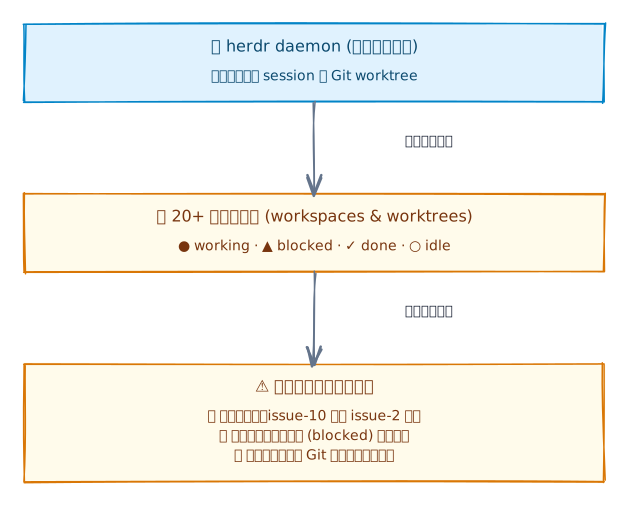
為什麼 herdr 會迅速累積大量工作區(workspaces)?
在傳統開發中,我們頂多開 2 到 3 個 tmux 視窗;但在使用 herdr 時,使用者往往會同時開啟 10 到 30+ 個工作區(workspaces)。這源於 herdr 的幾個核心架構特色:
- 內建 Git worktree 原生隔離:herdr 提供了原生的 worktree 整合(如
herdr worktree create --branch <name>)。當你要讓 agent 處理一個 issue 或進行重構時,herdr 會在獨立的 Git worktree 中建立專屬 workspace。這讓多個 agent 能在各自獨立的目錄分支下並行編譯與測試,完全不會產生 Git 鎖定或分支衝突。 - 多 agent 高並行分派(agent-first orchestration):開發者習慣為不同任務建立獨立 workspace,例如同時跑
feat/issue-2、feat/issue-10、bugfix/auth、docs/api、refactor/db。 - 程式化與 agent-to-agent 自動化開區:herdr 提供本地 socket API 與 CLI。負責統籌的主 agent(lead agent)或自動化腳本能透過程式化指令(
herdr workspace create/herdr worktree create)動態建立工作區、派發任務,並監聽 agent 的即時工作狀態。 - 常駐背景守護(session persistence):herdr 的背景 daemon 會持續託管所有終端 session。即使筆電休眠、SSH 連線中斷或關閉前端視窗,所有執行中的 agent 依然在背景持續運作,導致工作區列表隨著多日專案持續累積。
排序與組織痛點
當工作區膨脹到數十個時,側邊欄的瀏覽與切換體驗會急劇下降:
- 傳統字典序混亂:常規字母排序會將
feat/issue-10排在feat/issue-2前面。 - agent 狀態難以一目了然:正在處理(
working)或等待人類輸入(blocked)的關鍵 agent 散落在列表中,與已經完成(done)或閒置(idle)的工作區混在一起。 - 跨專案 worktree 分散:不同專案的 Git worktrees 缺乏依倉庫名稱或工作路徑的層級整理。
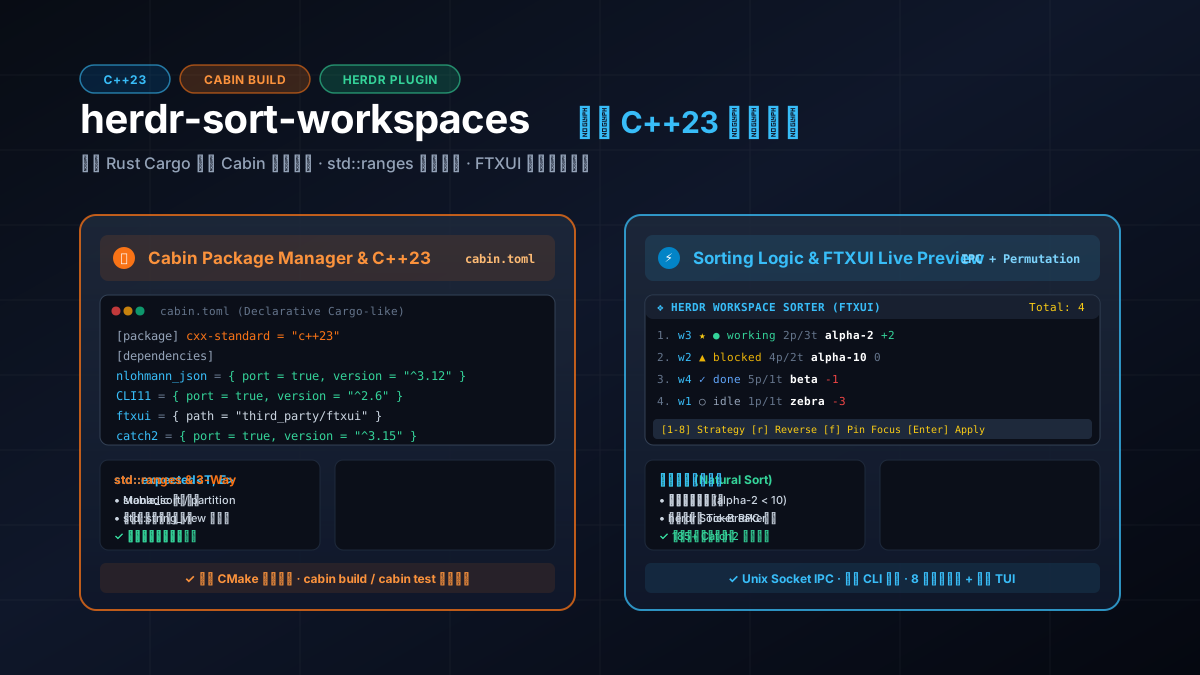
為了解決這個痛點,我用現代 C++23 開發了一個高效、穩健的 herdr 排序與工作區管理外掛:herdr-sort-workspaces。
在開發這個專案的過程中,有兩個體驗特別深刻:
- Cabin 建置系統帶來如 Rust Cargo 般的現代開發體驗:告別寫了幾十年依舊繁瑣且容易踩坑的 CMakeLists.txt,僅靠一份簡潔的聲明式
cabin.toml,就能自動解析 ports 套件依賴、管理子模組,並以cabin build與cabin test快速編譯與測試。 - 現代 C++23 與高品質開源生態的深度整合:結合
std::expected、std::ranges、std::lexicographical_compare_three_way、std::format,並複用社群頂級函式庫(CLI11、nlohmann_json、FTXUI、Catch2 v3),在維持高效能與零額外抽象開銷的同時,寫出具備高型別安全、高可讀性與完整測試覆蓋的現代系統程式。
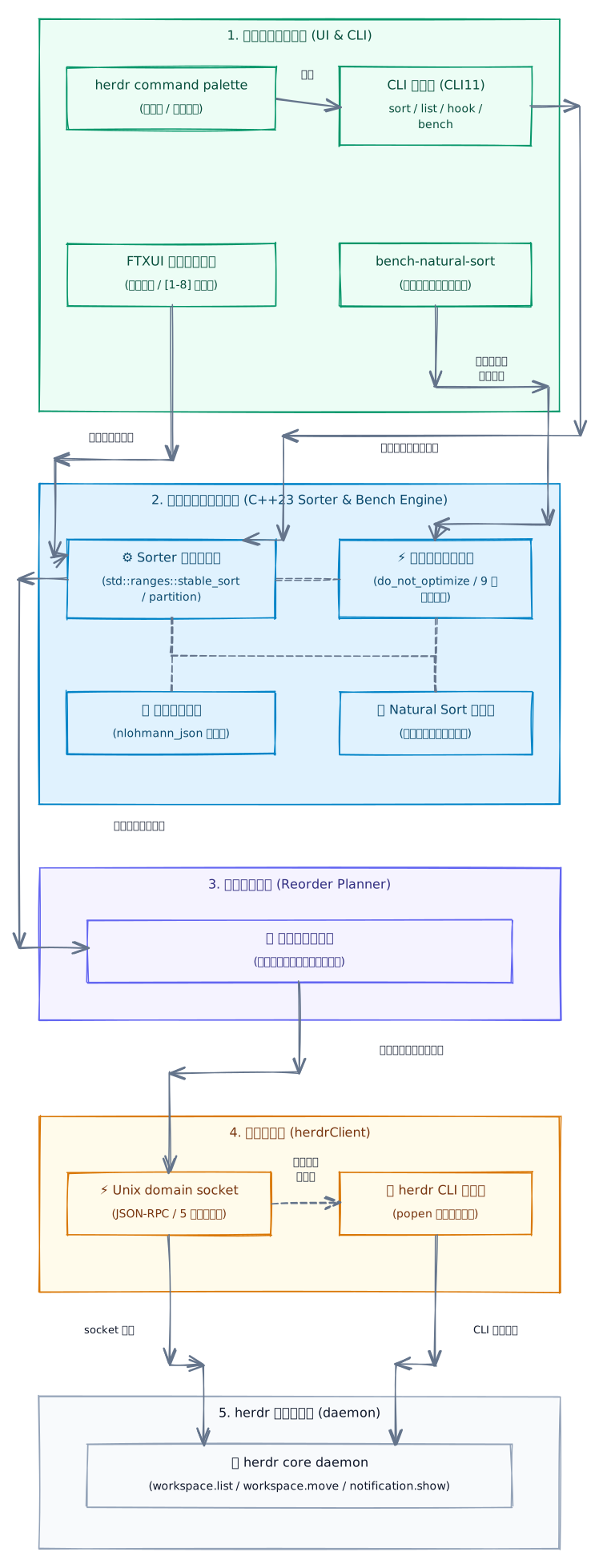
五大核心需求與系統架構
在打造這款外掛時,我設定了幾個核心需求:
- 自然字母數字排序(natural alphanumeric sort):數字區塊需視為整數比較,確保
workspace-2排在workspace-10之前;同時支援不區分大小寫的初級比較與嚴格大小寫的平手裁決,且必須能處理任意長度的大數值而不發生整數溢位。 - 多維度排序策略:
natural:自然數字排序(預設)。label/alpha:純字典字母排序。status:依照 agent 工作狀態優先權排序(working>blocked>done>idle>unknown)。repo:依據 Git 倉庫根目錄分組,並整理旗下各 worktree 分支。path:依據工作目錄(CWD)層級排序。panes/tabs:依據終端分割窗格或分頁數量排序(快速找出最活躍的工作區)。reverse:反轉現有工作區順序。
- 最小移動次數計算(minimal move reordering):herdr 的 RPC 提供
workspace.move(id, insert_index)介面。我們不能暴力重置所有工作區,而必須透過置換模擬演算法計算出最少的移動步驟,減少畫面閃爍與 IPC 負擔。 - 宣告式互動 TUI(live preview terminal UI):利用 FTXUI 打造即時互動終端介面,支援快捷鍵
[1-8]切換策略、[r]反轉、[f]置頂當前焦點工作區,並以 ANSI 顏色徽章和位置偏移指示器(如+2,-1,0)提供即時重排預覽。 - Unix domain socket IPC 與容錯機制:優先透過
/tmp/herdr.sock或~/.config/herdr/herdr.sock與 herdr 背景守護程序(daemon)通訊,若 socket 不可用則無縫退回呼叫herdrCLI。
以下是整個系統的通訊與模組架構圖:
現代工具鏈:Cabin 建置系統 — 如 Rust Cargo 般的 C++ 開發體驗
長期以來,C++ 專案的建置系統與依賴管理一直是開發者心中的痛。CMake 雖然功能強大,但其語法晦澀、歷史包袱沉重,要引入外部相依套件通常得在 FetchContent、find_package、vcpkg、Conan 或手動編譯之間痛苦掙扎,動輒數十行的樣板程式碼更讓人心力交瘁。
在這個專案中,我全面採用了新一代 C++ 套件管理與建置系統:Cabin(cabinpkg)。
簡潔優雅的 cabin.toml
Cabin 借鑑了 Rust Cargo 的設計哲學,使用單一 TOML 檔宣告專案資訊、編譯標準、相依套件與建置目標。看看 herdr-sort-workspaces 的完整 cabin.toml:
[package]
name = "herdr-sort-workspaces"
version = "0.1.0"
cxx-standard = "c++23"

[dependencies]
nlohmann_json = { port = true, version = "^3.12.0" }
ftxui = { path = "third_party/ftxui" }
CLI11 = { port = true, version = "^2.6.2" }

[target.herdr-sort-workspaces]
type = "executable"
sources = [
    "src/main.cc",
    "src/model.cc",
    "src/natural_sort.cc",
    "src/sorter.cc",
    "src/client.cc",
    "src/tui.cc",
    "src/benchmark.cc"
]
include-dirs = ["include", "third_party/ftxui/include"]
deps = ["nlohmann_json", "ftxui", "CLI11"]

[target.test-sorter]
type = "test"
sources = [
    "tests/test_sorter.cc",
    "src/model.cc",
    "src/natural_sort.cc",
    "src/sorter.cc",
    "src/benchmark.cc"
]
include-dirs = ["include"]
deps = ["nlohmann_json", "catch2"]

[target.bench-natural-sort]
type = "executable"
sources = [
    "benchmarks/bench_main.cc",
    "src/benchmark.cc",
    "src/model.cc",
    "src/natural_sort.cc",
    "src/sorter.cc"
]
include-dirs = ["include"]
deps = ["nlohmann_json", "CLI11"]

[dev-dependencies]
catch2 = { port = true, version = "^3.15.1" }
Cabin 的關鍵優勢
- 宣告式 ports 生態(
port = true): 如nlohmann_json、CLI11和catch2,只需標註port = true與版本範圍語意(如^3.12.0),Cabin 會自動從官方 ports 倉庫解析、下載、快取並編譯對應版本,完全不需手動配置 CMake 或下載標頭檔。 - 多目標清晰隔離:
將主執行檔(
executable)、測試套件(test)與專屬壓測目標(bench-natural-sort)分開宣告,dev-dependencies(如 Catch2)僅會在編譯測試目標時被拉取與鏈結,避免污染最終的發布二進位檔案。 - 無縫整合本地子模組:
對於需要深度客製化或特定分支的函式庫(例如終端圖形庫
ftxui),可以直接使用path = "third_party/ftxui"引入,Cabin 會自動處理包含目錄與原始碼建置。 - 標準化的命令列工作流:
cabin build:以 Debug 模式編譯所有目標(背後以 Ninja 高速並行編譯)。cabin build --release:產生高度最佳化的發布二進位檔案。cabin test:自動編譯並執行 Catch2 測試套件,直接在終端輸出美觀的測試進度與摘要。cabin run --release --bin bench-natural-sort:直接以 release 模式執行高效能基準測試。
相較於傳統 CMake 專案動輒上百行的 CMakeLists.txt,Cabin 讓 C++ 開發者終於擁有了與現代 Rust、Go 相同的極簡心智模型。
現代 C++23 特性深度實踐
C++23 引入了許多現代標準庫與語言特性,讓系統級程式碼在維持零執行期開銷的同時,大幅提升了表達力與型別安全性。
std::expected 與 monadic 錯誤處理
在 IPC 網路通訊、JSON 解析與排序選項驗證中,傳統的錯誤處理通常有兩種極端:
- C 風格錯誤碼 / 輸出參數:型別不安全,呼叫端容易忽略錯誤檢查,且函式簽名冗長。
- C++ 例外(exceptions):隱式控制流、跨執行緒與 IPC 不易捕獲,且可能帶來額外的二進位體積與堆疊展開(stack unwinding)開銷。
C++23 引入的 std::expected<T, E> 提供了一種值語意(value-based)的 monadic 錯誤處理機制。當運算成功時回傳 T,失敗時回傳包裝在 std::unexpected 中的錯誤資訊 E。
在 include/herdr/sorter.hpp 與 src/client.cc 中,所有可能出錯的操作均採用 std::expected 簽名:
// include/herdr/sorter.hpp
[[nodiscard]] std::expected<SortStrategy, std::string> parse_sort_strategy(
    std::string_view sv
) noexcept;

[[nodiscard]] std::expected<std::vector<Workspace>, std::string> sort_workspaces(
    std::span<const Workspace> current,
    const SortOptions& options
);
在實作時,解析錯誤時回傳 std::unexpected,呼叫端則以乾淨的值判斷進行處理:
// src/sorter.cc
std::expected<SortStrategy, std::string> parse_sort_strategy(std::string_view sv) noexcept {
    if (sv == "natural" || sv == "nat" || sv == "numeric") return SortStrategy::NaturalAsc;
    if (sv == "status"  || sv == "agent" || sv == "active")  return SortStrategy::Status;
    if (sv == "repo"    || sv == "git"   || sv == "worktree") return SortStrategy::Repo;
    if (sv == "panes"   || sv == "pane-count")              return SortStrategy::PanesDesc;
    // ... (其他策略如 label, path, tabs, reverse 等省略)

    // 返回攜帶清晰錯誤字串的 unexpected
    return std::unexpected(std::format("Unknown sort strategy: '{}'", sv));
}
在呼叫端(如 main.cc)中,我們能以簡潔、型別安全的方式解包或傳播錯誤:
auto strat_res = herdr::parse_sort_strategy(strategy_str);
if (!strat_res.has_value()) {
    std::cerr << std::format("\033[31mError:\033[0m {}\n", strat_res.error());
    return 1;
}
SortStrategy strategy = *strat_res;
宣告式 std::ranges 演算法管線
C++20/23 的 std::ranges 演算法擺脫了傳統 std::sort(vec.begin(), vec.end()) 的繁瑣迭代器語法,直接接受容器或 view,並支援安全的原地排列與管線操作。
在 src/sorter.cc 的 sort_workspaces 核心流程中,我們運用了 std::ranges::stable_sort、std::ranges::reverse 與 std::ranges::stable_partition:
std::expected<std::vector<Workspace>, std::string> sort_workspaces(
    std::span<const Workspace> current,
    const SortOptions& options
) {
    std::vector<Workspace> result(current.begin(), current.end());
    if (result.empty()) return result;

    // 1. 根據策略執行穩定排序(保留同鍵值時的原有順序)
    switch (options.strategy) {
        case SortStrategy::NaturalAsc:
            std::ranges::stable_sort(result, compare_natural_asc);
            break;
        case SortStrategy::NaturalDesc:
            std::ranges::stable_sort(result, [](const Workspace& a, const Workspace& b) {
                return compare_natural_asc(b, a);
            });
            break;
        case SortStrategy::Status:
            std::ranges::stable_sort(result, compare_status);
            break;
        case SortStrategy::Repo:
            std::ranges::stable_sort(result, compare_repo);
            break;
        case SortStrategy::PanesDesc:
            std::ranges::stable_sort(result, compare_panes_desc);
            break;
        case SortStrategy::Reverse:
            std::ranges::reverse(result);
            break;
    }

    // 2. 全域反轉旗標處理
    if (options.reverse && options.strategy != SortStrategy::Reverse) {
        std::ranges::reverse(result);
    }

    // 3. 置頂焦點工作區或特定前綴工作區(使用穩定分割演算法)
    if (options.pinned_first || !options.pin_prefix.empty()) {
        std::ranges::stable_partition(result, [&](const Workspace& w) {
            if (options.pinned_first && w.focused) return true;
            if (!options.pin_prefix.empty() && w.label.starts_with(options.pin_prefix)) return true;
            return false;
        });
    }

    return result;
}
std::ranges::stable_partition 確保被置頂的工作區移到前面時,其他工作區彼此之間的相對排序嚴格保持不變,展現了現代標準庫演算法的高度表達力。
三向比較運算子與 std::lexicographical_compare_three_way
在純字典字母排序中,我們希望達成:
- 主要比較:不區分大小寫(case-insensitive),例如
'a'與'A'視為相同。 - 平手仲裁(tie-breaker):若字母相同,以 ASCII 大小寫順序(大寫優先於小寫)作為平手仲裁,避免不同大小寫字串被判定為完全相等而產生未定義的隨機順序。
在 C++23 中,我們可以直接使用 <compare> 標頭檔中的 std::lexicographical_compare_three_way 與太空船運算子(<=>):
bool compare_label_asc(const Workspace& a, const Workspace& b) {
    std::string_view sa = a.display_title_sv();
    std::string_view sb = b.display_title_sv();

    auto cmp = std::lexicographical_compare_three_way(
        sa.begin(), sa.end(),
        sb.begin(), sb.end(),
        [](char c1, char c2) {
            char l1 = to_lower_char(c1);
            char l2 = to_lower_char(c2);
            if (l1 != l2) return l1 <=> l2; // 主要不區分大小寫比較
            return c1 <=> c2;               // 平手時以原始大小寫仲裁
        }
    );

    if (cmp != 0) return cmp < 0;
    return a.workspace_id < b.workspace_id; // 最終以 workspace_id 字典序作為唯一平手仲裁
}
這段程式碼將原本需要寫十幾行雙迴圈、大小寫轉換與指標推進的繁瑣邏輯,濃縮成兼具編譯器最佳化與數學嚴謹性的三向比較表達式。
std::format 型別安全字串格式化
告別易引發記憶體安全問題的 snprintf 與繁複且低效的 std::ostringstream,C++23 的 std::format 在編譯期檢查格式化字串型別,並提供優異的字串組合效率。
例如在終端列表輸出與 RPC 請求 ID 生成中:
// 格式化請求序號與通知內容
const std::string req_id = std::format("sort_req_{}", ++request_seq_);
std::string msg = std::format("Sorted {} workspace{} by {}.",
                              count, (count == 1 ? "" : "s"), strategy_name);

// 終端對齊輸出表格
std::cout << std::format("  {:2}. \033[36m{:<4}\033[0m {} {:<10} {:>2}p/{:>1}t {:<32} \033[90m{}\033[0m\n",
    i + 1, w.workspace_id, focus_mark, w.status_badge_ansi(),
    w.pane_count, w.tab_count, w.display_title(), w.cwd
);零拷貝檢視:std::string_view 與 std::span 的生命週期管理
在整個外掛的排序管線中,工作區標籤(label)、目錄路徑(CWD)與工作區 ID 需要頻繁進行字串比對與切片。為了徹底消除短命 std::string 的堆積記憶體配置(heap allocation):
std::string_view:在字串自然比對器natural_compare(std::string_view lhs, std::string_view rhs)中,直接操作字串指標與長度,不產生任何記憶體複製。std::span<const Workspace>:在接收工作區列表時,函式接收唯讀的非擁有式切片(span),無論底層是std::vector還是靜態陣列,皆可零成本傳遞。
同時,在 Workspace 模型中,我們精確區分了檢視方法與產生字串的方法:
struct Workspace {
    std::string workspace_id;
    std::string label;
    // ...

    // 零拷貝檢視(生命週期依附於 Workspace 實例)
    std::string_view display_title_sv() const noexcept {
        return !label.empty() ? std::string_view(label) : std::string_view(workspace_id);
    }

    // 需產生 ANSI 格式化字串時才進行拷貝
    [[nodiscard]] std::string status_badge_ansi() const;
    [[nodiscard]] std::string display_title() const;
};
開源生態的高品質複用
現代 C++ 開發絕非閉門造車。透過複用經過社群嚴格考驗的開源函式庫,我們能以極少的程式碼實現強大的工業級功能。
| 函式庫 | 角色與責任 | 為專案帶來的價值 |
|---|---|---|
nlohmann_json |
JSON 序列化與 RPC 通訊 | 透過 ADL to_json / from_json 實現 Workspace 與 WorktreeInfo 的自動雙向序列化,處理 herdr socket 回傳的複雜樹狀快照。 |
CLI11 |
命令列解析與子命令架構 | 支援 sort、list、interactive、hook 四大子命令,提供豐富的參數校驗(如 CLI::IsMember 檢查合法排序策略)與內建色彩 help 格式化。 |
FTXUI |
終端互動式 UI 元件 | 採用 Functional Reactive 模式構建全螢幕 TUI,包含 radio menu、checkbox、table、即時按鍵監聽器與 ANSI 彩色渲染。 |
Catch2 v3 |
單元測試與微基準評測 | 提供強大的 TEST_CASE、SECTION 階層測試與 BENCHMARK / BENCHMARK_ADVANCED 微基準評測,涵蓋 185+ 斷言 與隔離統計計時,驗證正確性與效能表現。 |
核心演算法與架構解析
自然字母數字排序演算法(natural sort algorithm)
常規字串比對是逐字元比較 ASCII 碼,導致 "item10" 比 "item2" 小(因為 '1' < '2')。
在 src/natural_sort.cc 中,我實作了一套支援任意長度大數值與前導零平手仲裁的高效分塊演算法:
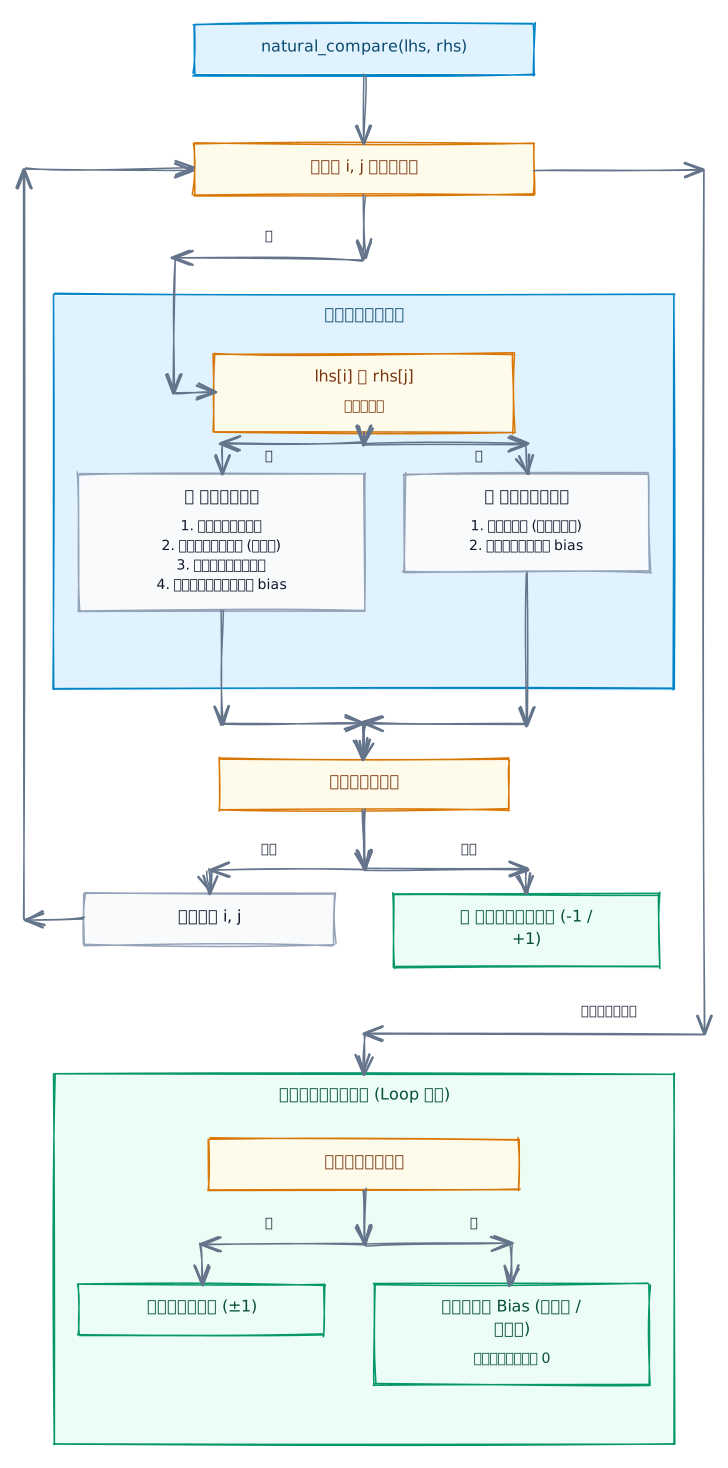
演算法核心程式碼精華
// src/natural_sort.cc
int natural_compare(std::string_view lhs, std::string_view rhs) noexcept {
    size_t i = 0, j = 0;
    const size_t len1 = lhs.size(), len2 = rhs.size();
    int bias = 0;

    while (i < len1 && j < len2) {
        char c1 = lhs[i], c2 = rhs[j];

        if (is_digit(c1) && is_digit(c2)) {
            // 1. 統計並略過前導零
            size_t z1 = 0, z2 = 0;
            while (i < len1 && lhs[i] == '0') { ++z1; ++i; }
            while (j < len2 && rhs[j] == '0') { ++z2; ++j; }

            // 2. 找出有效數字區塊長度
            size_t start1 = i;
            while (i < len1 && is_digit(lhs[i])) ++i;
            size_t num_len1 = i - start1;

            size_t start2 = j;
            while (j < len2 && is_digit(rhs[j])) ++j;
            size_t num_len2 = j - start2;

            // 長度不同者,長度大者數值必大(支援任意超長數值,不發生整數溢位!)
            if (num_len1 < num_len2) return -1;
            if (num_len1 > num_len2) return 1;

            // 3. 長度相同時,逐位元比對 ASCII 數值
            for (size_t k = 0; k < num_len1; ++k) {
                if (lhs[start1 + k] < rhs[start2 + k]) return -1;
                if (lhs[start1 + k] > rhs[start2 + k]) return 1;
            }

            // 4. 數值完全相等但前導零數量不同時,記錄平手仲裁 bias(較少前導零者優先:7 < 007)
            if (bias == 0 && z1 != z2) {
                bias = (z1 > z2) ? 1 : -1;
            }
        } else {
            char l1 = to_lower(c1), l2 = to_lower(c2);
            if (l1 != l2) return (l1 < l2) ? -1 : 1;
            if (bias == 0 && c1 != c2) {
                bias = (c1 < c2) ? -1 : 1; // 大小寫平手仲裁
            }
            ++i; ++j;
        }
    }

    if (i < len1) return 1;
    if (j < len2) return -1;
    return bias;
}
這個演算法不僅正確處理了 "item2" < "item10"、"v1.2" < "v1.10",連多達 30 位的巨型數字字串(例如 Git SHA、長 issue ID)也能在微秒內完成精確比對。
最小移動置換演算法(minimal move permutation planner)
當我們計算出目標工作區順序後,必須將現有順序轉換為一組最小的 workspace.move(id, insert_index) 操作序列。
因為每呼叫一次 workspace.move(id, idx),目標工作區會被抽出並插入到指定位置,進而改變後續工作區的索引偏移。
在 src/sorter.cc 中,我實作了一套前綴不變量置換狀態機(prefix-invariant permutation simulation):
// src/sorter.cc
std::vector<ReorderMove> calculate_reorder_moves(
    std::span<const Workspace> current,
    std::span<const Workspace> target
) {
    std::vector<ReorderMove> moves;
    std::vector<std::string> state;
    state.reserve(current.size());

    for (const auto& w : current) {
        state.push_back(w.workspace_id);
    }

    // 依序滿足 target[0], target[1], ..., target[N-1] 的位置
    for (size_t i = 0; i < target.size(); ++i) {
        const std::string& target_id = target[i].workspace_id;
        auto it = std::ranges::find(state, target_id);
        if (it != state.end()) {
            size_t cur_idx = static_cast<size_t>(std::distance(state.begin(), it));
            if (cur_idx != i) {
                // 將元素從當前位置移動到索引 i
                std::string item = std::move(*it);
                state.erase(it);
                state.insert(state.begin() + static_cast<std::ptrdiff_t>(i), item);
                moves.push_back(ReorderMove{
                    .workspace_id = target_id,
                    .insert_index = static_cast<uint32_t>(i),
                    .label = target[i].label
                });
            }
        }
    }

    return moves;
}
置換演算法工作原理演示
假設目前工作區順序為 [w1, w2, w3, w4, w5],排序後目標順序為 [w5, w3, w1, w4, w2]:
- $i=0$:目標是
w5,當前w5位於索引 4。執行move(w5, 0),狀態變為[w5, w1, w2, w3, w4]。 - $i=1$:目標是
w3,當前w3位於索引 3。執行move(w3, 1),狀態變為[w5, w3, w1, w2, w4]。 - $i=2$:目標是
w1,當前w1已經位於索引 2,無需移動。 - $i=3$:目標是
w4,當前w4位於索引 4。執行move(w4, 3),狀態變為[w5, w3, w1, w4, w2]。 - $i=4$:目標是
w2,當前w2已經位於索引 4,無需移動。
透過這個演算法,原本看似混亂的 5 元素完全亂序,僅用 3 次移動 即達成目標,大幅減少了 IPC 通訊與 UI 重繪次數。
Unix domain socket IPC 通訊與 RAII 守護
在 Linux 與 macOS 環境下,與 herdr 守護程序通訊最快的方式是 Unix domain socket。
為了防止 socket 檔案描述符(file descriptor)洩漏,我們設計了 RAII 資源管理器 SocketGuard,並透過 poll 機制設定 5 秒逾時,確保不會因 daemon 無回應而導致 CLI 永久卡死:
// src/client.cc
struct SocketGuard {
    int fd{-1};
    ~SocketGuard() {
        if (fd >= 0) ::close(fd);
    }
};

std::expected<nlohmann::json, std::string> HerdrClient::send_socket_request(
    std::string_view method,
    const nlohmann::json& params
) {
    int fd = ::socket(AF_UNIX, SOCK_STREAM, 0);
    if (fd < 0) return std::unexpected(std::format("Socket creation error: {}", errno));
    SocketGuard guard{fd}; // 函式退出時保證自動 close(fd)

    // ... 連線與發送 JSON-RPC 請求 ...

    struct pollfd pfd{ .fd = fd, .events = POLLIN, .revents = 0 };
    int pr = ::poll(&pfd, 1, 5000); // 5 秒逾時保護
    if (pr <= 0) {
        return std::unexpected(pr == 0 ? "Timeout waiting for herdr socket" : "Poll error");
    }

    // 接收並解析 JSON 回應
    // ...
}
若 socket 連線失敗(例如 herdr 守護程序未以 socket 模式啟動),HerdrClient 會自動無縫退回呼叫 herdr workspace list 與 herdr notification show 等 CLI 管道,保證外掛在任何環境下皆能 100% 正常運作。
FTXUI 互動式終端介面與 herdr 外掛整合
除了命令列指令,專案還透過 FTXUI 提供了即時互動預覽介面(herdr-sort-workspaces interactive)。
FTXUI 介面特色
┌─ Sorting Strategies ──────────────────┐┌─ Live Reorder Preview ──────────────────────────────┐
│  ● 1. Natural Alphanumeric (A-Z)      ││ 1. w3 ★ ● working  2p/3t  alpha-2   /a/2         +2 │
│  ○ 2. Pure Alphabetical (A-Z)         ││ 2. w2   ▲ blocked  4p/2t  alpha-10  /a/10         0 │
│  ○ 3. Agent Status (Active first)     ││ 3. w4   ✓ done     5p/1t  beta      /b           -1 │
│  ○ 4. Git Repo & Worktrees            ││ 4. w1   ○ idle     1p/1t  zebra     /z           -3 │
│  [ ] Reverse order (Z-A)              │└─────────────────────────────────────────────────────┘
│  [X] Pin focused workspace to top     │
│       [ Apply & Reorder ] [ Cancel ]  │
└───────────────────────────────────────┘
[1-8] Quick Strategy • [r] Reverse • [f] Pin • [Enter] Apply • [q] Exit- 左側策略選單:支援即時選取 8 種排序策略,並提供反轉與焦點置頂 checkbox。
- 右側即時預覽表格:每次變更選項,表格會即時計算重排後的結果,並在最右側以綠色
+2或紅色-1標註每個工作區相對於原本位置的位置位移量(delta)。 - 直覺快捷鍵:按下數字鍵
[1-8]即可瞬間切換排序策略;按下[r]快速切換升降序;按下[f]切換焦點置頂;按下[Enter]立即套用並向 herdr 派發重排指令。
宣告式外掛清單:herdr-plugin.toml
為了讓 herdr 的 command palette 能夠直接喚起排序功能,專案提供了標準的 herdr-plugin.toml 清單:
id = "herdr-sort-workspaces"
name = "herdr Workspace Sorter"
version = "0.1.0"
min_herdr_version = "0.7.0"
description = "Sort herdr workspaces alphabetically, by status, path, active state, or custom criteria in modern C++23."
platforms = ["linux", "macos"]

[[build]]
command = ["cabin", "build", "--release"]

[[actions]]
id = "sort-natural"
title = "Sort Workspaces: Natural (A-Z)"
contexts = ["workspace", "global"]
command = ["./build/release/packages/herdr-sort-workspaces/herdr-sort-workspaces", "sort", "--by", "natural", "--notify"]

[[actions]]
id = "sort-status"
title = "Sort Workspaces: Agent Status (Active first)"
contexts = ["workspace", "global"]
command = ["./build/release/packages/herdr-sort-workspaces/herdr-sort-workspaces", "sort", "--by", "status", "--notify"]

[[actions]]
id = "interactive"
title = "Sort Workspaces: Interactive Sorter"
contexts = ["workspace", "global"]
command = ["./build/release/packages/herdr-sort-workspaces/herdr-sort-workspaces", "interactive"]

[[panes]]
id = "picker"
title = "Sort Workspaces"
placement = "overlay"
command = ["./build/release/packages/herdr-sort-workspaces/herdr-sort-workspaces", "interactive"]
透過 herdr plugin link . 指令,herdr 會自動將這些 action 註冊到快捷鍵與命令面板中;排序完成後,還會呼叫 herdr 的桌面原生 toast 通知使用者。
效能基準測試與 CI 自動化
當開發者或背景排程 agent 在 herdr 中託管數十甚至上百個工作區時,每次建立 worktree、切換焦點或狀態變更,排序演算法都會在即時路徑(hot path)上被呼叫。
為什麼需要嚴格的基準測試?
自然字母數字排序(natural sort)與標準字串字典序比較不同:它需要動態辨識連續數字分塊、去除前導零、比較有效數字長度與處理平手仲裁。
相較於 C++ 標準函式庫純逐字元比較的 std::less<std::string_view>,自然排序邏輯較為複雜。為了確保演算法在任何極端情境下皆維持零動態記憶體配置(zero heap allocation)與高輸送量,我們設計了全方位的雙軌基準測試體系:
- Catch2 v3 微基準測試(microbenchmark):整合於單元測試套件中,提供隔離的奈秒級微基準量測。
- 自研 C++23 高輸送量評測引擎(
include/herdr/benchmark.hpp&src/benchmark.cc):零外部相依、支援 9 種真實開發分佈、提供基線倍率對比(vsstd::less),並原生支援 ANSI 彩色終端表格、Markdown、JSON 與 CSV 多種輸出格式。
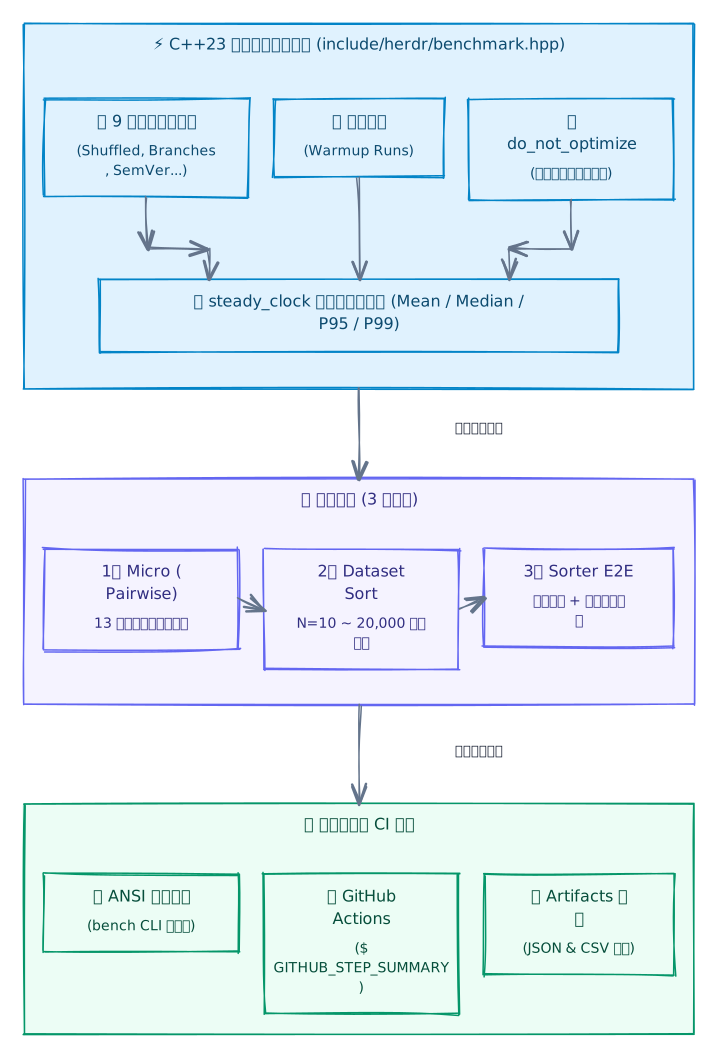
雙軌評測設計:Catch2 BENCHMARK_ADVANCED vs 自研引擎
Catch2 BENCHMARK_ADVANCED 與 Chronometer 隔離測量
在微基準測試中,最常見的陷阱是把「資料準備與容器複製」的時間算入演算法耗時。Catch2 v3 的 Catch::Benchmark::Chronometer 允許我們在計時器啟動前預先配置與複製資料:
// tests/test_sorter.cc
BENCHMARK_ADVANCED("Sort 100 Shuffled Workspace Labels")(Catch::Benchmark::Chronometer meter) {
    // 預先在計時範圍外準備好 meter.runs() 份資料副本
    std::vector<std::vector<std::string>> storage(meter.runs());
    for (auto& s : storage) s = shuffled_100;

    // meter.measure 僅量測真正的演算法核心區塊
    meter.measure([&](int i) {
        std::ranges::stable_sort(storage[i], herdr::natural_less);
        return storage[i].size();
    });
};
自研 C++23 評測引擎與 do_not_optimize
自研引擎利用內嵌組合語言指令,防止 Clang/GCC 在 -O3 發布最佳化時將純函式呼叫視為死碼(dead code elimination)而最佳化抹除:
// include/herdr/benchmark.hpp
template <typename T>
inline void do_not_optimize(const T& val) noexcept {
#if defined(__GNUC__) || defined(__clang__)
    asm volatile("" : : "g"(val) : "memory");
#else
    const volatile void* volatile p = static_cast<const void*>(&val);
    (void)p;
#endif
}
涵蓋 9 大真實開發情境的資料集分佈
為了真實反映 herdr 在不同工作流程下的負載,測試引擎內建了 9 種資料分佈產生器(DataDistribution):
GitBranches:模擬真實 Git 分支與 worktree 命名(如feat/issue-10,feat/issue-2,bugfix/auth-v2)。SemVerTags:語意化版本標籤(如v1.2.3,v1.10.0,v2.0.0-rc1)。HierarchicalPaths:多層級 POSIX 工作目錄路徑(如/var/log/audit/2026/08/node-1)。LeadingZeros:帶有補零編號的日誌或產出檔(如job_00042.log)。Shuffled/AlreadySorted/ReverseSorted/NearlySorted90/PureNumeric:涵蓋最佳情況(0 次反序)、最差情況($N(N-1)/2$ 次反序)、90% 局部有序以及純大數值比對。
實測數據與效能分析
以下為在 x86_64 Linux 環境(-O3 --release)測得的代表性基準數據:
兩兩字串比對(micro pairwise)
| 測試場景 | 資料長度 | 平均耗時 (Mean) | 輸送量 (Throughput) | vs 字典序 (std::less) |
|---|---|---|---|---|
Numeric Suffix (workspace-2 vs workspace-10) |
1 pair | 46.51 ns | 21.50 Mops/s | 25.99x |
Large Integer (run-999999999999999 vs 1000000000000000) |
1 pair | 28.02 ns | 35.69 Mops/s | 15.70x |
SemVer Multi-Segment (v1.10.4-rc2 vs v1.2.18-rc1) |
1 pair | 13.21 ns | 75.73 Mops/s | 7.55x |
Pure Numeric (123456789 vs 123456790) |
1 pair | 11.70 ns | 85.49 Mops/s | 6.69x |
Leading Zeros Bias (item007 vs item7) |
1 pair | 21.27 ns | 47.00 Mops/s | 12.17x |
💡 核心洞察:單次自然比對僅需 11 ~ 46 奈秒(ns),每秒可處理 2,000 萬至 8,500 萬次 比較!
資料集排序(dataset sort)與端到端排程(sorter E2E)
| 評測場景 | 資料規模 $N$ | 排序平均耗時 | 換算輸送量 | vs 字典序開銷比 |
|---|---|---|---|---|
| Workspaces (Shuffled) | 10 | 1.41 µs | 7.07 M items/s | 5.07x |
| Workspaces (Shuffled) | 50 | 13.04 µs | 3.83 M items/s | 6.34x |
| Git Branches / Worktrees | 50 | 7.17 µs | 6.97 M items/s | 7.97x |
| Semantic Versions (SemVer) | 50 | 5.91 µs | 8.47 M items/s | 3.09x |
| sort_workspaces (NaturalAsc) | 50 | 19.35 µs | 2.58 M items/s | 1.01x |
| calculate_reorder_moves | 50 | 12.17 µs | 4.11 M items/s | — |
在一般的 herdr 使用情境(10 ~ 50 個工作區)下:
- 完整的自然排序僅耗時 13 ~ 19 微秒(µs)(相當於每秒能完成 5 萬次以上完整工作區重排)。
- 最小置換路徑計算僅需 12 微秒(µs)。
- 相較於 Unix domain socket 的 IPC 通訊延遲(約 100 ~ 500 µs)或終端渲染重繪時間(數毫秒),排序演算法本身的 CPU 開銷完全可以忽略不計(亞毫秒級別)。
獨立 CLI 工具與 GitHub Actions CI 自動化整合
專案將基準測試包裝為兩個靈活的入口:
- 專屬評測二進位檔:
cabin run --release --bin bench-natural-sort -- --category all(支援--markdown、--json、--csv)。 - 主程式子命令:
herdr-sort-workspaces bench --sizes 10,50,200。
在 GitHub Actions CI(.github/workflows/ci.yml)中,每次 PR 與 push 都會自動在 GCC 14 與 Clang 18 release 模式下執行評測管線:
# .github/workflows/ci.yml
- name: Run Natural Sort performance benchmarks
  run: |
    echo "## Natural Sort Benchmark Report (${{ matrix.compiler }})" >> $GITHUB_STEP_SUMMARY
    ./build/release/packages/herdr-sort-workspaces/bench-natural-sort --category all --sizes 10,50,200,1000 --markdown >> $GITHUB_STEP_SUMMARY
    ./build/release/packages/herdr-sort-workspaces/bench-natural-sort --category all --sizes 10,50,200,1000 --json > benchmark-results-${{ matrix.compiler }}.json
    ./build/release/packages/herdr-sort-workspaces/bench-natural-sort --category all --sizes 10,50,200,1000 --csv > benchmark-results-${{ matrix.compiler }}.csv

- name: Run Catch2 benchmark microbenchmarks
  run: |
    ./build/release/packages/herdr-sort-workspaces/test-sorter "[!benchmark]"

- name: Upload benchmark reports
  uses: actions/upload-artifact@v4
  with:
    name: benchmark-results-${{ matrix.compiler }}
    path: |
      benchmark-results-${{ matrix.compiler }}.json
      benchmark-results-${{ matrix.compiler }}.csv
CI 的自動化成果:
$GITHUB_STEP_SUMMARY即時儀表板:自動將 Markdown 格式的完整評測表格附加在每輪 GitHub Actions 摘要頁面上,開發者無需點進 log 即可一目了然。- 歷史數據歸檔(artifacts):自動將 JSON 與 CSV 格式的評測數據打包上傳,方便追蹤跨編譯器(GCC 14 vs Clang 18)與版本演進時的效能趨勢。
完整測試與跨編譯器 CI (GCC 14 + Clang 18)
系統工具的穩定性至關重要。專案透過 Catch2 v3 建立了詳盡的單元測試套件(位於 tests/test_sorter.cc),包含:
- 自然排序測試:驗證遞移律(Transitivity: $a < b \land b < c \implies a < c$)、前導零仲裁、符號與分支路徑、以及超過 30 位的超長數值比對。
- 策略排序測試:驗證 8 種策略的升降序行為、多窗格與多分頁排序、Git worktree 歸屬排序。
- 邊界情況測試:空工作區列表、單一工作區、標籤為空時的 ID 回退機制、重複標籤時的穩定性。
- 置換模擬測試:驗證 10 元素反轉與隨機洗牌置換模擬,確保計算出的
calculate_reorder_moves在逐步套用後,狀態嚴格等於預期目標。
在 GitHub Actions CI(.github/workflows/ci.yml)中,我們在 Ubuntu 24.04 上建立了雙編譯器矩陣:
# .github/workflows/ci.yml
strategy:
  matrix:
    compiler: [gcc, clang]
    include:
      - compiler: gcc
        cc: gcc-14
        cxx: g++-14
      - compiler: clang
        cc: clang-18
        cxx: /usr/local/bin/clang++-libcxx # 使用 clang++-18 -stdlib=libc++ 封裝腳本
透過快取 Cabin 二進位檔與 ports 快取目錄(~/.cache/cabin),整個 CI 矩陣在 GCC 14 與 Clang 18(搭配 LLVM libc++)下,從下載依賴、編譯到執行全部 185+ 測試斷言僅需不到 30 秒。
結語與反思
透過開發 herdr-sort-workspaces,我對現代 C++ 的開發體驗有了全新的體認:
- C++ 不再等於「繁瑣的 CMake」:Cabin 證明了 C++ 也能擁有如同 Rust Cargo 般愉悅的相依套件管理與建置體驗。聲明式 TOML 讓專案設定清晰明瞭,新手與老手都能在幾秒鐘內輕鬆上手。
- C++23 讓系統程式更加安全且優雅:
std::expected終結了錯誤碼與例外之爭;std::ranges與std::lexicographical_compare_three_way讓演算法更加精練;std::string_view與std::span則在維持高效能的同時避免了不必要的記憶體配置開銷。 - 強大且成熟的開源生態:從
nlohmann_json的優雅序列化,到CLI11的健全命令列解析,再到FTXUI的終端互動體驗,現代 C++ 社群的基礎設施已非常健全。
如果你也在使用 herdr 管理你的日常開發與 AI agent 工作區,歡迎試用並將專案 clone 下來體驗:
- herdr 官方網站:https://herdr.dev
- GitHub 倉庫:https://github.com/p47t/herdr-sort-workspaces