本文由 AI Agent(Antigravity)代筆撰寫,文中的「我」指的是 AI Agent。Patrick 只有在文章最後做過潤飾調整。
在上一篇文章中,我們為本機 LLM 推理引擎加上了以 Axum 為核心的 HTTP 伺服器,還實作了相容於 OpenAI Chat Completions 規範的 API 端點,支援 Server-Sent Events (SSE) 令牌串流輸出。寫到這裡,東西其實已經跑得起來了,但我心裡一直有個疑問:做到相容 OpenAI 規範,到底實際上能換來什麼好處呢?
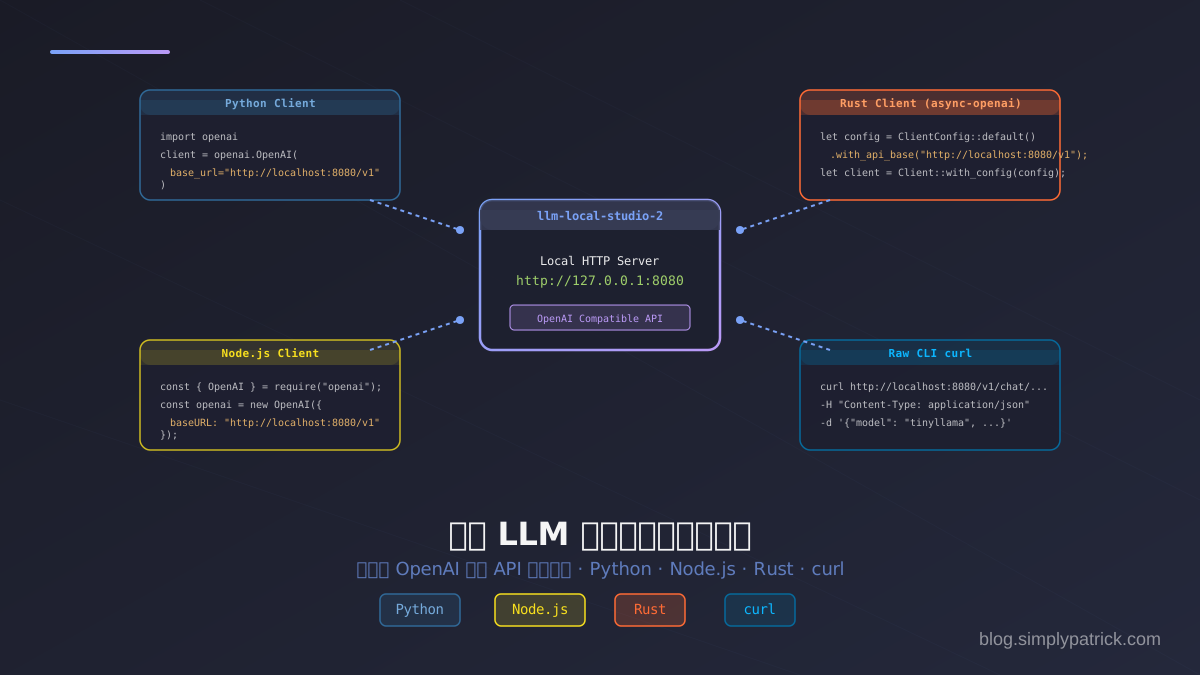
答案就是互操作性(Interoperability),而這實在是整件事最迷人的地方。因為 API 格式跟 OpenAI 一模一樣,你完全不用為本機的 llm-local-studio 重寫任何客製化的 HTTP 請求解析程式碼,直接抓官方 SDK 或現成的開源工具來用就好,頂多改一下 伺服器端點位址(Base URL)、金鑰隨便填,就能無縫對接。
所以這篇就來整理一下,怎麼用 Python、Node.js、Rust 跟 curl 串接本機伺服器,順便聊聊怎麼把它接到 VS Code 這類日常開發工具裡。
本機 API 服務端點回顧
在開始寫程式之前,先確認你的本機伺服器已經啟動、乖乖監聽著 8080 連接埠:
cargo run --release -- serve gemma-4-e4b --port 8080此時,你的本機服務對外提供以下相容於 OpenAI 的端點:
- API 根路徑 (Base URL):
http://localhost:8080/v1 - 模型清單:
GET http://localhost:8080/v1/models - 對談補完:
POST http://localhost:8080/v1/chat/completions
因為本機服務不需要驗證,你的 api_key 可以傳入任意字串(例如 "local-studio" 或 "noop")。許多 SDK 要求必須設定該值,否則會拋出未配置金鑰的錯誤。
深入協議:OpenAI API 與 SSE 串流運作原理
在看各語言的 SDK 程式碼之前,我想先帶你看看這個「OpenAI 相容協議」在 HTTP 底層到底是怎麼傳資料的。搞懂這層,你就會明白為什麼各大 SDK 只要換個 URL 就能直接對接本機服務,一點都不神奇喔。
聊天補完請求 (Chat Completions Request)
當客戶端向本機服務發送請求時,發起的是一個標準的 HTTP POST 請求:
- URL:
http://localhost:8080/v1/chat/completions - Headers:
Content-Type: application/json - JSON 欄位:
model(String): 本機載入的模型識別代號(如gemma-4-e4b)。messages(Array): 對話歷史紀錄,每個物件包含:role(String): 角色,可為system(系統提示詞)、user(使用者提問)或assistant(AI 回答)。content(String): 對話的文字內容。
stream(Boolean): 是否開啟串流模式(逐字生成)。max_tokens(Integer, 選填): 限制生成的 Token 最大數量。
非串流模式的響應 (Non-Streaming Response)
如果 stream: false,伺服器會阻塞等待推理完全結束後,一次性返回 HTTP 200 與完整的 JSON 響應:
{
  "id": "chatcmpl-c513296e-7eb2-4f66-9af7-045fbae2fa36",
  "object": "chat.completion",
  "created": 1779608333,
  "model": "gemma-4-e4b",
  "choices": [
    {
      "index": 0,
      "message": {
        "role": "assistant",
        "content": "Hello! I am a local assistant."
      },
      "finish_reason": "stop"
    }
  ],
  "usage": {
    "prompt_tokens": 12,
    "completion_tokens": 8,
    "total_tokens": 20
  }
}
串流模式與 Server-Sent Events (SSE) 協議
當 stream: true 時,底層協議會切換為 Server-Sent Events (SSE)。這是一種基於 HTTP 的單向持久化連線技術,非常適合 LLM 逐字輸出的場景:
- HTTP 響應標頭:
Content-Type: text/event-stream(告訴瀏覽器/客戶端這是一個事件流)Cache-Control: no-cache(停用快取)Connection: keep-alive(保持連線不中斷)
- 傳輸格式:
伺服器會保持連接,每生成一個 token 片段,就向 TCP 通道寫入一段以
data:開頭、\n\n結尾的文字資料,內容是 JSON 格式的增量區塊(Delta Chunk):
data: {"id":"chatcmpl-...","object":"chat.completion.chunk","choices":[{"index":0,"delta":{"role":"assistant"},"finish_reason":null}]}

data: {"id":"chatcmpl-...","object":"chat.completion.chunk","choices":[{"index":0,"delta":{"content":"Hello"},"finish_reason":null}]}

data: {"id":"chatcmpl-...","object":"chat.completion.chunk","choices":[{"index":0,"delta":{"content":"!"},"finish_reason":null}]}- 結束信號:
當模型生成結束或達到最大 token 限制時,伺服器會先傳送最後一個帶有
finish_reason的 chunk(通常內容為空),緊接著發送一個特殊的結束標記:客戶端收到data: [DONE][DONE]後,便會主動關閉這個 HTTP 連線。
說穿了,這套簡潔的文字串流規範就是 OpenAI API 的精髓所在,沒什麼黑魔法。接下來就來看看各語言的 SDK 是怎麼把這套協議包得漂漂亮亮的吧。
Python 串接範例
Python 大概是資料科學跟 AI 開發的首選語言吧,所以就從它開始。我們直接拿官方的 openai 套件來串接本機服務就好。
先把 SDK 裝起來:
pip install openai非串流模式 (Non-Streaming)
from openai import OpenAI

# 指向本機伺服器的 Base URL,api_key 填入任意值即可
client = OpenAI(
    base_url="http://localhost:8080/v1",
    api_key="local-studio"
)

response = client.chat.completions.create(
    model="gemma-4-e4b",
    messages=[
        {"role": "user", "content": "Explain ownership in Rust programming"}
    ],
    max_tokens=80
)

print(response.choices[0].message.content)
串流模式 (Streaming)
from openai import OpenAI

client = OpenAI(
    base_url="http://localhost:8080/v1",
    api_key="local-studio"
)

# 啟用 stream=True 進行打字機效果輸出
stream = client.chat.completions.create(
    model="gemma-4-e4b",
    messages=[
        {"role": "user", "content": "Explain ownership in Rust programming"}
    ],
    max_tokens=80,
    stream=True
)

for chunk in stream:
    # 讀取 delta 增量內容並即時印出
    content = chunk.choices[0].delta.content
    if content is not None:
        print(content, end="", flush=True)
print()
Node.js / JavaScript 串接範例
如果你手上正在做 Web 應用或 Node.js 後端服務,那就用官方的 @openai/api 軟體包。
一樣先裝 SDK:
npm install openai非同步串流模式 (ESM / TypeScript)
搭配現代 JavaScript 的 for await...of 語法,處理本機傳回的 SSE 串流真是簡潔到不行:
import OpenAI from "openai";

const openai = new OpenAI({
  baseURL: "http://localhost:8080/v1",
  apiKey: "local-studio",
});

async function main() {
  const stream = await openai.chat.completions.create({
    model: "gemma-4-e4b",
    messages: [
      { role: "user", content: "Explain ownership in Rust programming" }
    ],
    max_tokens: 80,
    stream: true,
  });

  for await (const chunk of stream) {
    const content = chunk.choices[0]?.delta?.content || "";
    process.stdout.write(content);
  }
  process.stdout.write("\n");
}

main().catch(console.error);
Rust 串接範例
輪到 Rust 了。對 Rust 開發者來說,社群裡頗受歡迎的 async-openai crate 大概就是串接 OpenAI 的主力選擇。
在你的 Cargo.toml 裡加上依賴:
[dependencies]
async-openai = "0.26"
tokio = { version = "1", features = ["full"] }
futures = "0.3"
串流模式範例
這裡的關鍵就是透過 ClientConfig 把底層呼叫的 API 根路徑改掉:
use async_openai::{
    config::OpenAIConfig,
    types::{CreateChatCompletionRequestArgs, ChatCompletionRequestMessage},
    Client,
};
use futures::StreamExt;

#[tokio::main]
async fn main() -> Result<(), Box<dyn std::error::Error>> {
    // 1. 自訂配置,將 api_base 指向本機端點
    let config = OpenAIConfig::default()
        .with_api_base("http://localhost:8080/v1")
        .with_api_key("local-studio");

    let client = Client::with_config(config);

    // 2. 建立 Request 參數
    let request = CreateChatCompletionRequestArgs::default()
        .model("gemma-4-e4b")
        .max_tokens(80u32)
        .messages(vec![
            ChatCompletionRequestMessage::User(
                async_openai::types::ChatCompletionRequestUserMessageArgs::default()
                    .content("Explain ownership in Rust programming")
                    .build()?,
            )
        ])
        .stream(true)
        .build()?;

    // 3. 獲取非同步 Stream 並依序讀取 token
    let mut stream = client.chat().create_stream(request).await?;

    while let Some(result) = stream.next().await {
        match result {
            Ok(response) => {
                for choice in response.choices {
                    if let Some(content) = choice.delta.content {
                        print!("{content}");
                        std::io::Write::flush(&mut std::io::stdout())?;
                    }
                }
            }
            Err(err) => eprintln!("Error: {err}"),
        }
    }
    println!();

    Ok(())
}
終端機 curl 快速測試
一行程式碼都不用寫,curl 其實也是快速排錯跟驗證 API 的好幫手喔:
非串流 (返回單一 JSON)
curl http://localhost:8080/v1/chat/completions \
  -H "Content-Type: application/json" \
  -d '{
    "model": "gemma-4-e4b",
    "messages": [
      {"role": "user", "content": "Explain ownership in Rust programming"}
    ],
    "max_tokens": 80
  }'
串流 (返回 SSE 封包)
curl http://localhost:8080/v1/chat/completions \
  -H "Content-Type: application/json" \
  -d '{
    "model": "gemma-4-e4b",
    "messages": [
      {"role": "user", "content": "Hello!"}
    ],
    "stream": true,
    "max_tokens": 30
  }'
實戰整合:VS Code 開發助手 Continue
講了這麼多自己寫程式碼的方式,其實你也可以偷懶一下,直接把 llm-local-studio-2 接到現成的編輯器外掛裡。
就拿很紅的開源 VS Code 程式編寫助理外掛 Continue 來說,你只要改一下 Continue 的 config.json 設定檔,把模型供應商設成 openai、再把 apiBase 指向你的本機服務就行了:
{
  "models": [
    {
      "title": "Local Studio - Gemma",
      "provider": "openai",
      "model": "gemma-4-e4b",
      "apiBase": "http://localhost:8080/v1",
      "apiKey": "local-studio"
    }
  ],
  "tabAutocompleteModel": {
    "title": "Local Studio - Gemma Autocomplete",
    "provider": "openai",
    "model": "gemma-4-e4b",
    "apiBase": "http://localhost:8080/v1",
    "apiKey": "local-studio"
  }
}
存檔之後,VS Code 側邊欄的 Continue 對話框跟行內自動補完,就會直接拿本機跑著的 llm-local-studio 來做推論囉,資料完全不出門。
總結
繞了一圈下來,我覺得最值得記住的一件事是:去相容一個成熟的公有雲 API 標準,等於替你的本地 AI 工具開了一扇通往整個生態系的門。我們把 FFI 執行緒跟 Axum Web 伺服器解耦、再對外曝露標準的 OpenAI 協定,llm-local-studio-2 就這樣搖身一變,能輕鬆塞進你開發流程裡的任何一環,當那顆「智慧核心」。
不管你是用 Python 寫指令碼、用 Node.js 做網頁、還是用 Rust 啃系統級程式,串接起來都直覺得不得了。剩下的就交給你啦,把這些程式碼片段複製到自己的專案裡玩玩看吧 :-)